Hi,
Please find here after some link to myHD v3 (it’s a release candidate BUT very near stable version)
=== sorry but I have been very busy and reduce free time (I am a user like you) to work on.
====== DO ONLY FRESH INSTALL , save home folder if need and remove myHD v2 or v3 Beta before using this APKG
[New in v3]
… a documentation can be downloaded
… a management interface is now in a shellinweb terminal (https)
… Ubuntu is 2404 L.T.S. installed now in /share/myHD
… Ubuntu repository and PPA are supported
… for exchange with ADM and save your own contents a new share id added : /share/myHD_data
… APKG is build to support update APKG provide without Ubuntu (so small) … so after a full APKG install (~700+ Mo) … update can be (your choice) limited in size (~25 Mo) so very quick install …
… AppImage are supported (with small exception and some arguments require (ex. no sandbox when browser integrated is a little old)
… Flatpak supported except some App. (Browser) refusing to run in embedded namespace) … Flatpak support permit an easy integration of Plex Desktop and Plex HTPC delivered in Flatpak format
… snap IS NOT SUPPORTED (embedded namespace)
… Default is to see after start Openbox/Idesk interface using astr user
… … remember Openbox is the windows manager (session) and Idesk the large icon launcher (similar to Asportal)
… … a dynamic menu (Openbox menu) is available to add your own launch menu for myHD and any applications.
… login is done using SDDM (hide by auto login) easy to re-introduce for security access.
… and lot of others … discover it yourself.
[First companion applications] … remember you are welcome to install any application if you know how.
… Chrome browser is include (update internal or using Ubuntu tools (apt)
… Kodi20 … the default Ubuntu repository version need to use apt for adding add-ons
… Kodi21 … compiled in /opt using HOME/.kodi for settings (need to validate or not add-ons at first start)
… Kodi21+ Flatpak … Kodi21 and update use (all Flatpak) HOME.var/xxxx for settings
… Plex Desktop Flatpak … the full client for desktop in conjunction with any Plex server
[Works in progress]
… Firefox (from Ubuntu PPA)
… Plex HTPC (Flatpak)
… Doc. how to create an icon launcher for idesk
… Doc. how use the myHD Openbox menu
… Doc. how create your own companion application (based on existing APKG provide (easy).
[Bugs]
… certainly A LOT … but if you don’t fall in …it’s so lucky that you must also play lottery … you are a winner … perhaps 
[Download page] … if you want to don’t use browser just get the URL and use tour preferred tool.
I have try to used the new “community” repository
… but it’s slow … from France
… need lot of entry (not similar to Dev. Corner)
… for APKG out of AppCentral (my target is to put all my APKG in AppCentral after some use time)
… file size is limited and not enough for myHD (Ubuntu engine)
The positive aspect of the repo. is to have a unique access for APKG disseminated in the forum
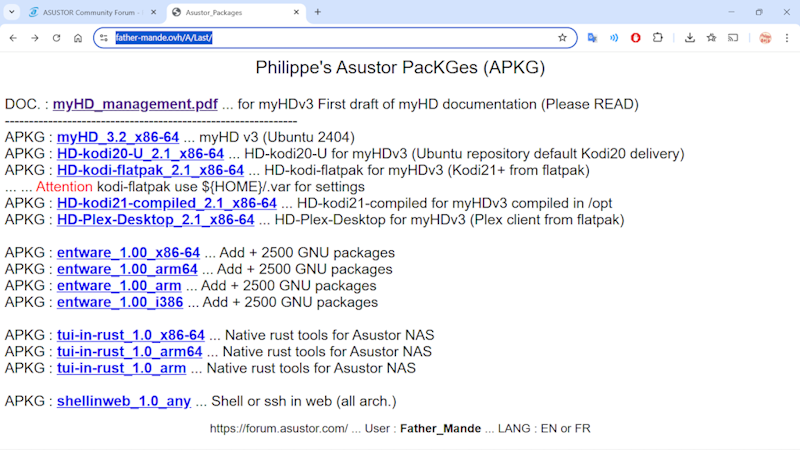
So, for the moment, I have put all myHD (engine and App.) + some others APKG in a single place with a VERY small web interface
link to download page : Asustor_Packages
Philippe.