Hi all
Have only had my AS5402T for about a month.
This is the second time this has happened.
All of a sudden I can no longer log in to the NAS via a web browser. I put the user name and password, it starts logging in and the goes back to the log in screen.
It does not shake login screen as if password etc are wrong.
Last time this happened I reset using the button on the back.
Then started again. Bit worried it has done it again. New to NAS so don’t think I have done anything wrong.
Any help would be appreciated.
Cheers
Adam
A hard power reboot sorted this error.
Anything I can do to stop this recurring?
Still stuffed it let me log in once and then went back to not let me log in.
Will have to do a full reset again.
That’s a new one to me. Tell me everything about how the NAS and your LAN is set up and I’ll see if I can spot anything. And I mean everything…
Thankyou for your reply.
Its basically default setup have not changed any network settings.
Just have apps installed docker/sonarr/prowlarr/qbitorrent and pihole.
As I am just practicing setting it up on an old drive before I get a new one in the new year.
I created a user adam with admin privileges and have been logging in as that.
I can still login in via ssh as admin and adam users, so can I get any logs etc. that might help?
Tried logging on as default admin and password but that does not work.
If I try to see dockers running I do get this, not sure if it helps not great with docker
Now get this instead of a login screen
Is my rootfs full or am I just seeing things?
I am on 5.1.1.RCI1, but it did also do it on the previous software.
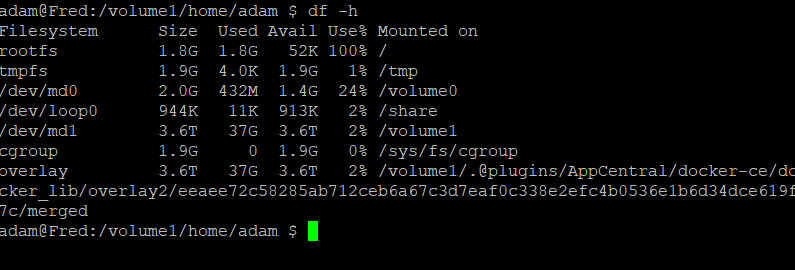


It does look like rootfs is full. I think you should raise a support ticket and include those screenshots.
Thank you for your help.
Will do that today and update this thread.
Have a Good New Year.
Have raised a support ticket. They asked for the logs from ADM which I cant get to and then reset to see if rootfs is still 100%.
No longer get the login screen now get this.
Cannot reset using button as does not work even after 10 seconds.
Can I pull the hard drive and put another one in and start from scratch?
Thanks
Adam

Yes, that should work. I’ve just done that with my test NAS - I took out all the high-end SSDs and HDDs, put in some spares and it re-initialised.
It’s worth doing as it will show if the fault is something on your HDD or on the system eMMC.
Thanks will do that and look at rootfs after.
I will also monitor it after each install of apps, run each for a while before the next install and see if that helps point to the possible issue.
To ensure its not user error.
Ok so I think this may have been user error.
I ‘tried’ to setup qbittorrent, prowlarr, sonarr and radarr via docker containers not really knowing what I was doing.
On the last hardrive I remember when I did this and download some test torrents like Big Buck Bunny but could not find out were they had downloaded to.
I think I may have been the one that filled up rootfs. 
Thanks for your help.
New drive installed and just using Asustor Apps, so It does not happen again.